WTware boot from USB Flash.
Please, read WTware boot ways manual at first!
WTware terminal is able to boot from USB-flash disk.
ATTENTION! While WTware installation all data will be lost!
To create boot flash-disk use "WTware USB installer" utility in WTware configurator. Program requires local administrator rights, for it writes to flash boot sectors.
Program window:
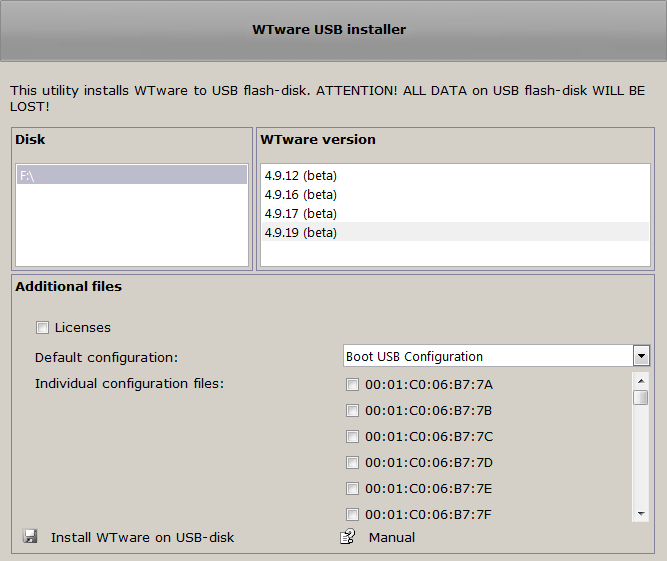
Disk
Select from the list disk, to which install WTware.
WTware version
Select from the list of available WTware versions the one to write to disk.
Additional files
- Specify WTware terminal configuration file
in
"Default configuration" field. Configuration file name is insignificant. It will be renamed so that any terminal regardless of its MAC-address could boot from this flash and use configuration file parameters. Later this file can be edited on terminal.
Also it's possible to write several configuration files to USB -individual configuration files. When terminal boots it searches for its personal configuration file, and if failes it reads default configuration. - Specify file with WTware licenses in
"Licenses"field. Every terminal that boots from flash will search this file for its license.
Install WTware to USB-disk
Start installation. While installation all files on flash will be deleted, WTware files and loader will be written to it.
You can store your own files on flash with WTware installed. Unfortunately, there's no way to hide WTware files.
If you have any comments or remarks to this article, please,
let us know!